
How to Send A Hotel Room Request to Disney – Automatically!
Did you know that TouringPlans can help you request a specific room for your stay at a Disney World Resort? I’ll show you how. First we’ll go through the basic process, and then we’ll tackle some special situations.
Getting Started
There are a few things you need in order to set up your room request.
- First, you need to be TouringPlans member with Walt Disney World access. Don’t have access yet? Click here to join.
- Second: I feel like this ought to be obvious, but you need to have a reservation at a Disney World Resort Hotel.
- The request workflow optionally uses the TouringPlans Room Finder. If you’ve never used it before, you might want to take a minute to look over our walkthrough.
One thing that can be a point of confusion: you can only use our room request tool with Disney-operated hotels. No Disney Springs good neighbors, no Swan/Dolphin, no Four Seasons. (Sorry! We would if we could.)
Room Request Tool
The TouringPlans Room Request Tool is here:
https://touringplans.com/walt-disney-world/room-request
The page looks like the screen on the left below (on the right is what you see if you check the Room Characteristics: “Input Manually” box).
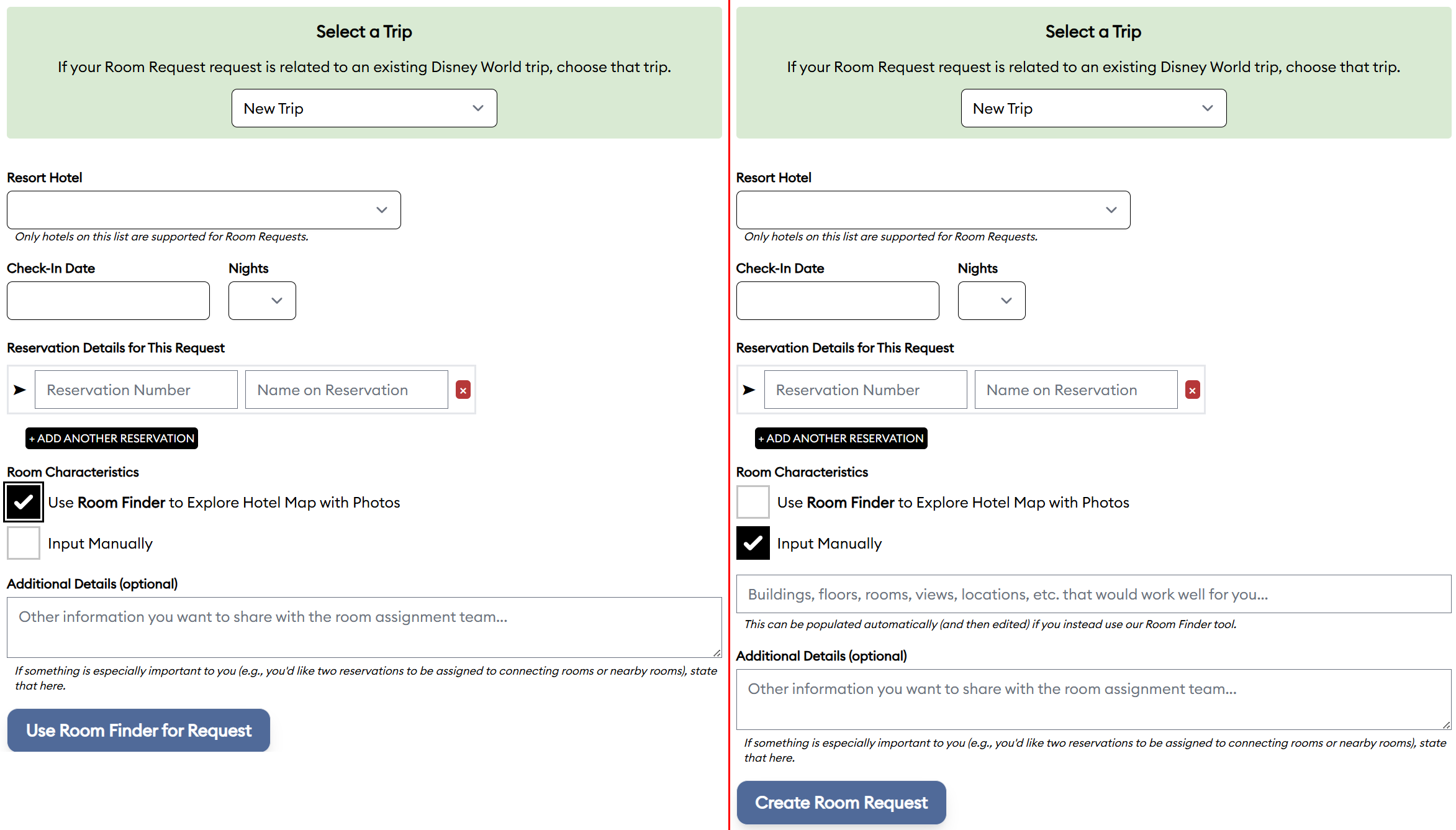
If you want to request a room for an existing Trip (and, optionally, Hotel Reservations) on your TouringPlans Dashboard, you can select it from the green box at the top. If not, leave that option set to “New Trip.”
Make sure to input the hotel, check-in date, nights, and reservation details. (If the check-in dates or nights are different for the various reservations listed with your request, you’ll be able to customize those reservation dates later.) If you would like to use the Room Finder to explore rooms, check that box. Otherwise, select “Input Manually” and type in what sort of room you’d like (e.g., “anything on the ground floor”).
The “Additional Details” are optional, but some people like to use that explain how they’d like multiple reservations associated (e.g., request connecting rooms), what room characteristics matter most, whether anything special is being celebrated, etc. The easier you can make it for a room assigner to understand what would make you happy, the better your chances they’ll be able to do it.
If you’re using the Room Finder, you’ll click Use Room Finder for Request and be taken to the Room Finder, where you can filter and/or navigate to select a room that will be used to generate Room Characteristics for your request.
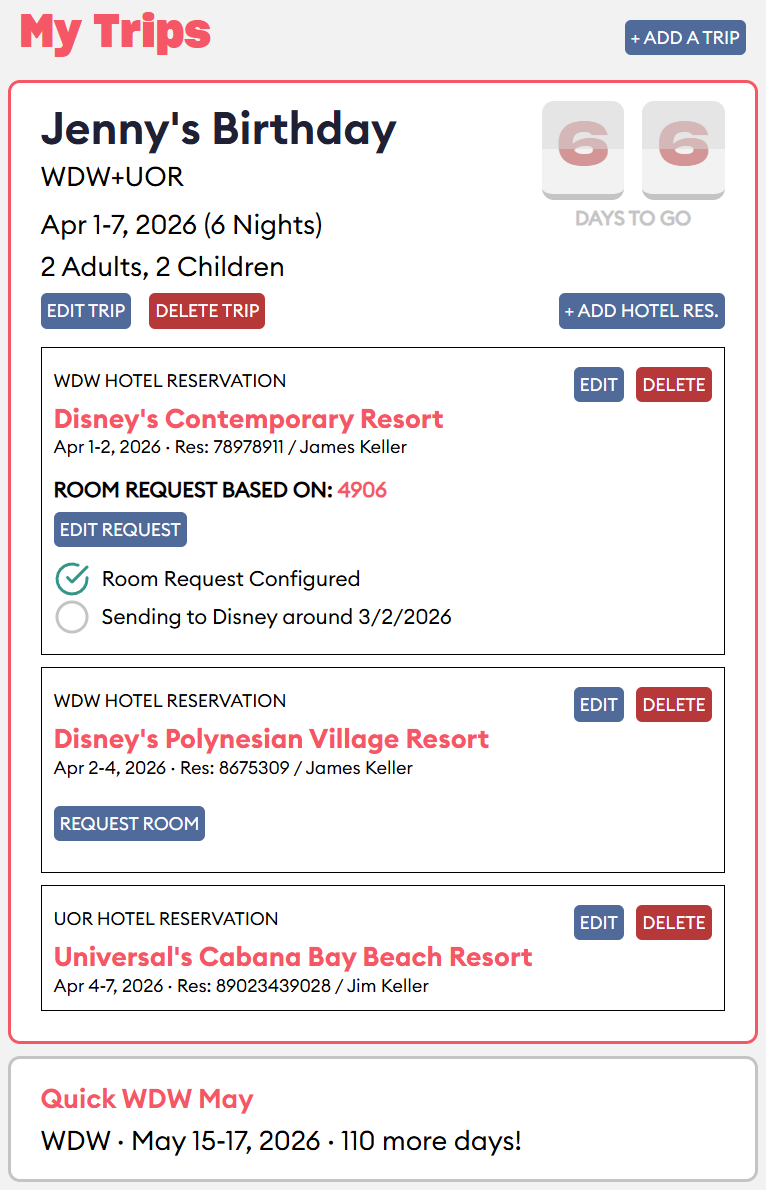
After creating the request, you’ll be taken to your TouringPlans Dashboard for your Trip. From there you can edit your Trip, Hotel Reservations, or Room Requests.
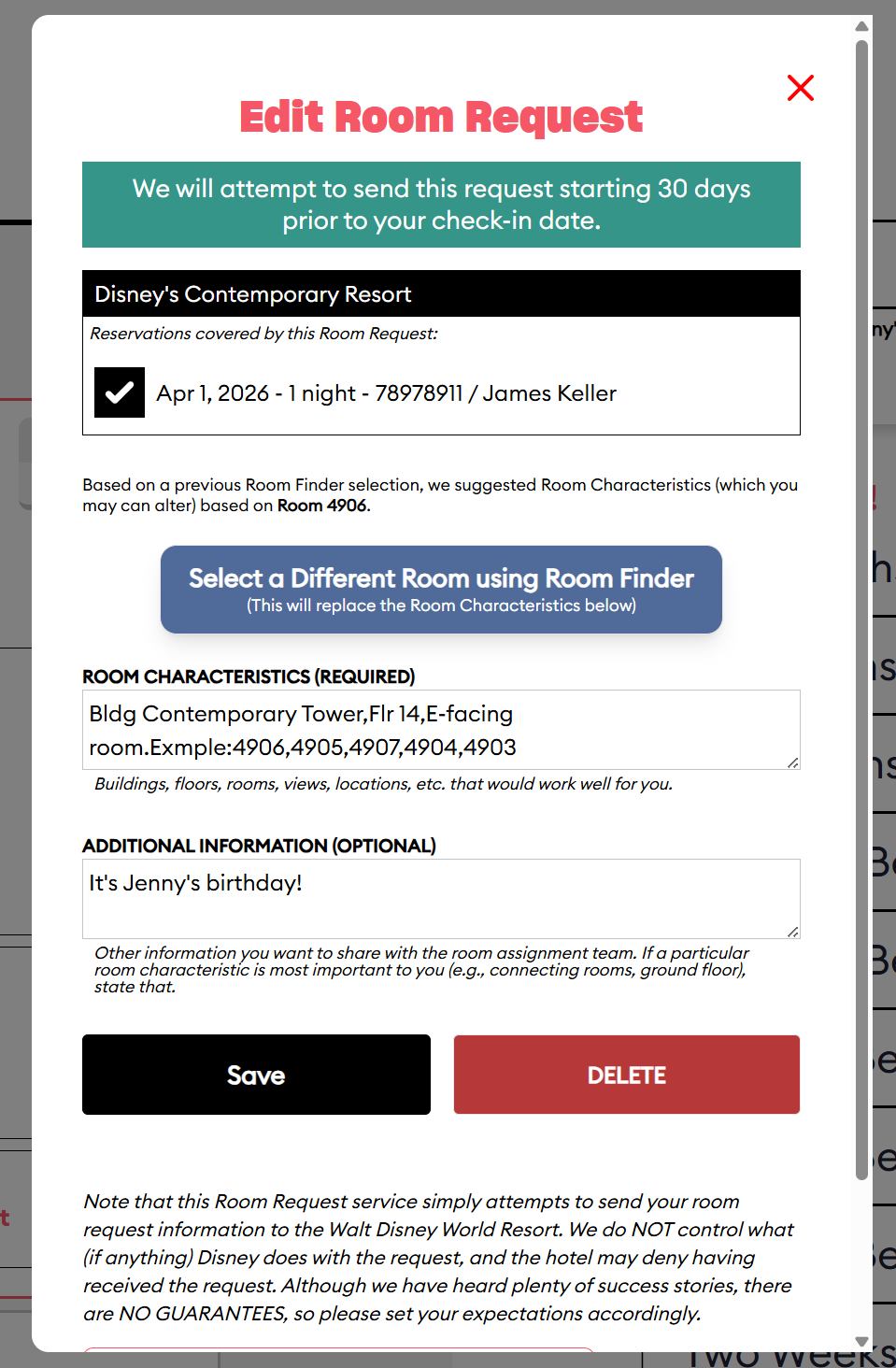
Even if you use Room Finder, you may want to adjust the Room Characteristics to customize them for what you want.
Overall, the simpler you can keep your list of requests, the more likely you are to get a room you’ll like. That’s just statistics, so don’t clutter up your request with things that won’t really make a big difference to you.
Disclaimer
The fact that we send the request does not mean that Disney World will give you the room you want. Think of it like an invitation: you’re holding a party and you send invites to your guests. Do have any control over whether they come, or even whether they RSVP so you know that they got it? Nope – and it’s the same thing here.
You should also know that the request goes to the room assignment team, not to someone whose job it is to make a note on your reservation. So when you check in, don’t expect a front desk Cast Member to be able to see whether or not there was a request for a specific room. This can be true no matter if we placed the request, or if you called Disney to try to make it directly.
If you don’t get your requested room, neither Disney nor TouringPlans has wronged you. If your request is granted, you’ve been blessed with some extra magic! And either way, you can enjoy your Disney World trip.
Common Questions
What if my trip is less than 30 days away?
If your trip is 2 or more days away, we’ll send your request the next morning by around 8:30 AM. After that, it’s up to Disney. We don’t send requests for reservations that are checking in day-of or next-day, because the odds of success are so low.
What if I want to change the room I requested?
Go back to your Dashboard, click to EDIT REQUEST, and select another room. Your new request will replace the old one. You’ll need to redo any changes you made to contact information or Additional Requests.
If it’s less than 30 days from your trip and your request has already been sent, we’ll send a new the next morning (as long as you’re not checking in today or tomorrow). We recommend that you make a note in the Additional Requests section explaining that you intend this to replace a previous request for the same reservation number. As previously noted, we have no insight into Disney’s timeline or workflow for assigning rooms, so the only thing we can guarantee about your request is that we’ll send it.
Why does my list of example rooms include rooms that aren’t my selected View/type?
From time to time Disney will change which rooms are listed under which categories and sometimes the amenities will change as well. We do our best to keep our hotel maps accurate, but the list of rooms is really meant to help the room assigner understand what you’re looking for. If you booked a Preferred room, having a Standard on your list of examples is not going to keep you from getting a Preferred room. But it will help give the assigner a sense of the location and/or view that you’d prefer.
What about requests during Disney’s Online Check-in?
Using online check-in (sometimes called direct-to-room service) offers you the opportunity to make some general requests like “Near the elevator” or “Near the pool”. Which options you’ll be offered varies with the resort.
We don’t know of any reason why you shouldn’t add requests here if you’ve used our service to send a room request. But remember what we keep saying – the easier you make it for the room assigner to know what you want, the more likely you are to get it. If you write “I prefer a room on the lowest floor” on the request you submit with us and then select “Upper level room” during online check-in, your room assigner may throw up their hands in disgust and pick your room by throwing a dart at a map.
I didn’t get the room I wanted. Is there anything I can do?
You can always visit the front desk of your resort after check-in and ask if there’s a way that your room can be adjusted. Cast Members will often accommodate these requests based on space and availability. Be nice when you ask – it’s the right thing to do, plus all Cast Members are people and people are generally known to try harder for people that are polite to them.
Have you used TouringPlans Room Request service? Did we miss any questions above? Let us know in the comments!

You May Also Like...
-

A great hotel room can really make your vacation sweeter. Even within the same resort and room type, some Disney World…
-

We’re here with a series of quick posts, “Disney in a Minute,” bite-sized nuggets of information that can better help you…

Hello Touring Plans! We purchased the book and subscription for our first big WDW holiday in 2022. Both were hugely helpful! I don’t know that I need to buy the updated book (especially as things at WDW have changed incredibly so quickly), but I would like to renew my online subscription. My quick question is – if I’ve booked at Poly via a 3rd party, will room requests made via TouringPlans be looked at? I know requests aren’t guaranteed, but just curious if there is any information about requests made by those with 3rd party bookings. Thanks for any advice, and thank you for your invaluable website!
Hi MCG, yes, they will look at your request, but there’s a tiny catch about sending it. In order to put in the room request you’ll need to fill in the reservation # on the dashboard – that means the reservation # in My Disney Experience, not the confirmation # you’ll receive from a third-party booker. If your third-party gave you a reservation # “to link your reservation in My Disney Experience” somewhere, that’s probably the one you want. If not, this article has some helpful tips about how to get it (it’s for a slightly different scenario but the advice is the same). Once the reservation is linked in MDE, you should be able to see the confirmation # there and that’s what you’ll put into the trip on the dashboard for us to send with your room request. I hope this makes sense!
https://touringplans.com/blog/using-early-theme-park-entry-disney-world-good-neighbor-hotels/
Hi Jennifer,
That’s brilliant – thank you! I do have my 3rd party reservation linked on MDE, so sounds like I’ll be good with the request. Thanks so much for the clarification 😀
Last year I requested a preferred room at Pop Century. I paid for a preferred room and the room I requested was marked as a preferred room on the Touring Plans site. I was given a totally different room in a different building and area. I was disappointed, but we ended up appreciating the location of the new room. We are going again in December. I thought about requesting a Standard Pool View room that would be just a few rooms down from where we stayed last year. I am hesitating since last time I did not get a room close to where I requested.
How successful are people getting the rooms they want? I spoke to a reservation person at Disney and she said usually people get the room they want. Was my experience just a fluke?
We don’t have a good way to tell the success rate because we only send the request. After that, we have no idea what room gets assigned. The only way we know whether people got something like they requested or not is if – like you have – they come back and tell us one way or the other. And we do hear stories both ways; people like you who were somewhere else completely, and people who tell us that they got exactly what they requested.
From my own personal experience with the room request, I would say that I am not always successful, but I get what I requested often enough to say that the requests do have an effect a fair amount of the time. I don’t think what you experienced is a fluke. But I do think Disney tries to give people the room they want, if it’s possible.
Would this be available for Disney Hilton Head Resort?
Hi Chad, sorry but it’s only for Disney World right now.
Hi! I’m renting DVC points and have made a general request through the DVC owner but have since realized that I’d like to be more specific about room requests. My party has three DVC rooms in total and we really wanted two connecting and the third as near as possible. If I register with you will you be able to make requests for us even though we are not owners? I was told only owners can contact Dvc.
Hi Kathleen,
The request is put in using the reservation number and your name to the room assigners. It doesn’t go to DVC. That said, there is absolutely no guarantee that a request will be successful. We have lots of subscribers who report getting great rooms that match their request. We also have plenty who report getting a room on the opposite end of the resort from the one they requested. Good luck!
Your response doesn’t sound like it would apply to the DVC side. I’ve been told numerous times that only owners can make requests and that room assignments are made by DVC for that side. If you would be using my name and reservation number it wouldn’t match DVC records of the owners name. Unless I am misunderstanding your answer.
I’ve made requests for DVC rooms through this system many times, but as the owner. There is nothing that marks the request on our side as being from the owner or not from the owner. But we don’t have access to Disney’s side of the process, and there may or may not be some marking on the reservation from their side that dictates a different handling if the room is in your name and not in the owner’s name.
We can submit the request for you as long as the reservation is in your name. We have no control over what Disney does with the request based on how information lines up with their records.
If I were you (literally, if I were in your shoes), I would get the subscription and put in the request. Nothing ventured, nothing gained, and there’s no guarantee of success even if you were the owner. For under $20, I would take the gamble. But I’m not in charge of your budget, and I’m willing to toss off the result as “Eh, I tried” if it doesn’t work out. If you’re not comfortable with the uncertainty, then you shouldn’t buy a subscription solely for the use of the Room Request feature.