
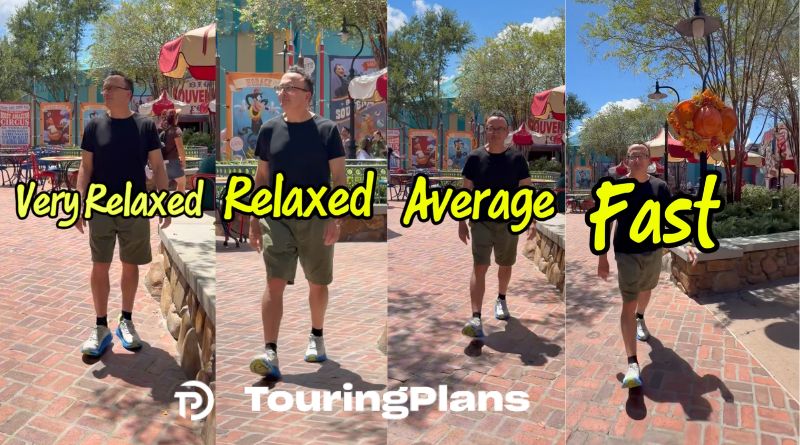
Len Demonstrates TouringPlans Walking Speeds
TouringPlans Lines app users! Do you adjust your walking speed when you’re using a touring plan? If so, have you ever wondered what we mean by the four different options on the sliding scale?
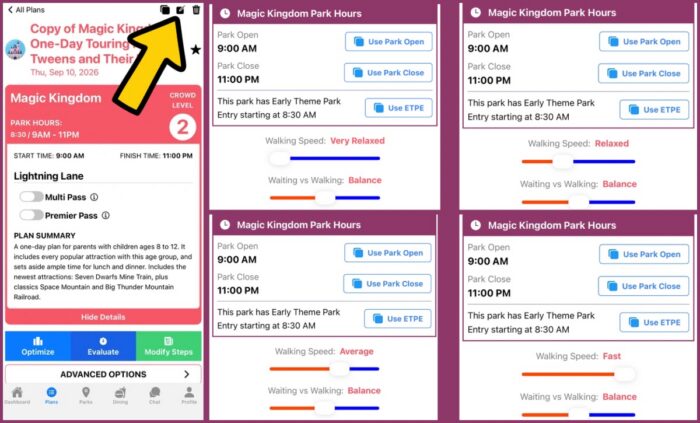
Once you have chosen and copied your plan, select the edit button as shown in the image above. You’ll be taken to your plan menu where you can select your start and stop times, Early Entry info, etc. You’ll also have the option to set your Walking Speed. There are four Walking Speed options:
- Very Relaxed
- Relaxed
- Average
- Fast
The Touring Plans algorithm will consider your walking speed preferences when suggesting your next attraction. For example, if you prefer a Very Relaxed walking speed, the algorithm will not suggest Space Mountain right after you exit Peter Pan during Early Entry. Conversely, if you select a Fast walking speed, your plan may have you hustling back and forth across a park to take advantage of lower waits with your speedy speed.
Check out Len’s Walking Speed examples in the video below and let us know which one you prefer!
You May Also Like...
-

Len has been running wait time numbers for Walt Disney World ~more than 1 million of them!~ to help you maximize…
-

Cool Kids' Summer kicked off this week in Disney World and there is so much to see and do! Especially for…
Oscar worthy!
This is helpful BUT there should be a link to counselling so those of us who are Fast or Extra Fast who marry an Extra Relaxed can learn breathing techniques and mantras so we don’t ruin a day or two of our Disney trips (which DEFINITELY DID NOT happen to me).
Jokes aside this is helpful, and Len did a great job demonstrating!
Based on the feedback we’ve been getting, we’re sure to get a group rate for these counseling sessions. I have molded (some would say “beaten down”) my husband into a real rope drop hustle partner, but there are times he forms his mouth to say he’s hungry before we’ve even made it to our first ride. And we’re still married. I’ll send you the rates when we find the right therapist. ~ Chrissy
Love it! Thanks
Thank you for the note, Alice! I keep track of the nice comments so I can convince Len to do another video when I want! Ha! ~ Chrissy